Free Tool
Font Substitute Finder
Find similar fonts, compare real typefaces, and choose a replacement with confidence.
Find a SubstituteWhich font are you replacing?
Search the measured Fontish catalogue.
No source font selected.
What matters most?
Choose the job the replacement needs to do.
Optional requirements
Narrow the candidates when your project has practical constraints.
Choose a font to get started.
What Is the Fontish Font Substitute Finder?
Finding a font you love is easy. Finding a suitable replacement when that font doesn’t work for your project? That’s where things get interesting.
The Fontish Font Substitute Finder is a free tool that helps you discover similar fonts based on visual characteristics and practical design needs. Whether you’re replacing a font, exploring alternatives, or looking for a typeface that fits your project better, it gives you a shortlist worth testing.
Not every font substitute needs to look identical. Sometimes you want the closest visual match. Other times, readability, personality, or flexibility matters more than matching every letterform.
That’s why the tool lets you choose what matters most, refine your recommendations with optional requirements, and preview different typefaces using your own text.
Each recommendation includes a similarity score to help you evaluate potential matches. You can also compare fonts before deciding which one deserves a place in your design.
The goal isn’t simply to find another font. It’s to find the right alternative for the job.
How to Find the Right Font Substitute
A good font substitute should do more than resemble the original. It should also work in the design you’re creating.
The Fontish Font Substitute Finder helps you narrow down the options in a few steps, then compare the results before making a decision.
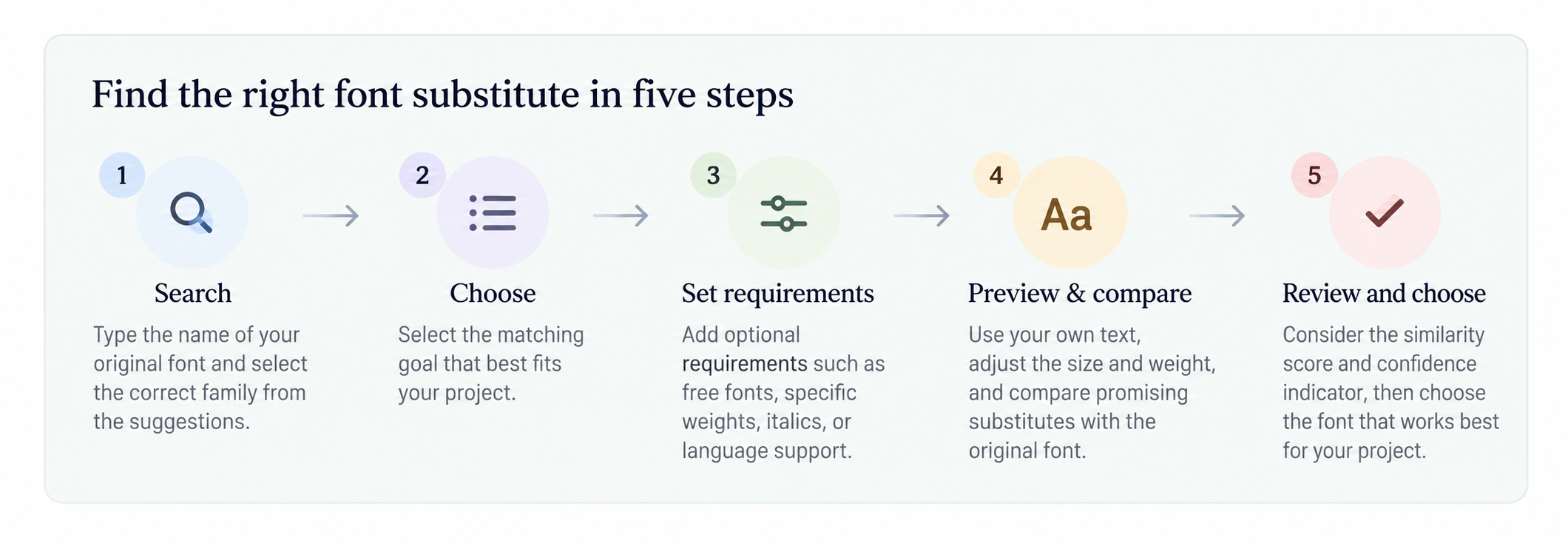
1. Search for the font you want to replace
Start by typing the name of your original font into the search field. Choose the correct family from the suggestions so the finder knows which typeface you’re working with.
For example, if you’re looking for an alternative to Lora, search for Lora rather than a general term such as serif font.
2. Choose what matters most
Select the matching goal that best reflects your project.
A close visual match is useful when you want to preserve an existing design. But if you’re redesigning a website or improving long-form readability, another matching goal may lead you toward more suitable alternatives.
Think about the font’s job before deciding how closely it needs to resemble the original.
3. Add optional requirements
Use the optional requirements to narrow your results when you have specific needs, such as font availability, supported weights, italics, or language coverage.
Only select requirements that matter to your project. Too many restrictions can exclude otherwise useful candidates.
4. Preview and compare your recommendations
Once the recommendations appear, replace the sample text with something from your actual design. A brand name, article headline, or short paragraph will tell you more than a generic specimen.
Adjust the preview size and weight, then compare promising substitutes with the original font.
Pay attention to letter shapes, proportions, spacing, and how the text wraps. Two fonts can look remarkably similar at headline size but behave quite differently in a narrow mobile layout.
5. Review the scores and choose your font
The similarity score gives you a useful starting point, while the confidence indicator provides additional context for the recommendation.
Neither should make the final decision for you.
A slightly lower-scoring font may offer better readability, more suitable weights, or a stronger fit for your brand. Use the Compare option to inspect candidates, then Get font to visit the font source and review its licensing details.
The best substitute is the one that preserves what matters about your original font while working better for your project.
Font Substitute Finder FAQs
What is a font substitute?
A font substitute is a typeface used in place of another font because it offers a similar appearance or serves a comparable purpose.
A good substitute might share the original’s proportions, letter shapes, or overall personality. However, similar-looking fonts aren’t necessarily interchangeable. Differences in spacing, weights, and character design can affect the finished layout.
How does the Font Substitute Finder choose similar fonts?
The Fontish Font Substitute Finder evaluates font characteristics and recommends alternatives based on your selected matching goal.
You can refine the results with practical requirements, such as available weights, italics, and language support. Each recommendation includes a similarity score and confidence indicator to help you compare candidates.
These scores are useful guides, not guarantees of an identical appearance. Always inspect promising fonts using your own text.
Can I find free alternatives to paid fonts?
Yes, you can use the finder to explore free alternatives to a font, provided the original font is available in the tool’s searchable catalogue.
Select the free-font requirement to narrow your recommendations. You can then preview suitable candidates and visit their sources to check the applicable licenses.
Remember that free availability doesn’t automatically mean unrestricted use. Always review the font’s licensing terms before downloading or using it in a project.
Will a substitute font have the same spacing as the original?
Not necessarily. Even fonts with similar letterforms can differ in character widths, kerning, x-height, and line spacing.
These differences become especially noticeable in navigation menus, tightly fitted headlines, and responsive layouts. A substitute might fit perfectly on desktop but wrap onto an extra line on mobile.
For important projects, test the replacement at its intended size, weight, and container width before making the switch.
Can I use font substitutes for commercial projects?
Yes, many font substitutes can be used commercially, but permission depends on the license of the font you choose.
Some licenses allow commercial websites, branding, print materials, and redistribution under specific conditions. Others place restrictions on certain uses.
The finder helps you discover and compare alternatives; it doesn’t replace a license review. Before using a font commercially, open its source and confirm that the license covers your intended application.